Posts

Showing posts with the label CSS

Change Css background or text Color When you select a text in website

 <style> ::selection { background-color: #E13300; color: white; } ::-moz-selection { background-color: #E13300; color: white; } </style>

My new Jquery Plugin name is krDailog

Image
This is my new jquery plugin i hope this is use full to you if you require this plugin than contact me  /*     krDailog Version 1.0     Author: krButani     email: butanikartik1108@gmail.com */ Require to use this function     - bootstrap.css new version     - bootstrap.js new version     - jquery.js new version     - jquery-ui.js new version     - glyphicons font by bootstrap # you can use new version of all and also use min file also # include file first this way     <link rel="stylesheet" type="text/css" href="css/bootstrap.min.css">     <link rel="stylesheet" type="text/css" href="css/krDailog.css">     <script type="text/javascript" src="js/jquery.min.js"></script>     <script type="text/javascript" src="js/jquery-ui.min.js"></script> ...

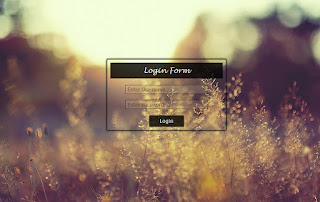
Login Form Design 1

Image
The Code is : <!DOCTYPE html> <html> <head>     <meta charset="UTF-8">     <title>krButani     <style type="text/css">         html,         body {             min-height: 100%;         }         body {                         background: url("../img/1.jpg") left top;             background-size: cover;             background-repeat: no-repeat;         }         .login-design {             margin: 20% 33%;          ...

How to create a fix dimension ( width * height) textarea

In Html, give text area and we can set width and height but site user can move the textarea. This solution Is available in css. We can use resize attribute to create a fix text area. So, let’s see example HTML File Is : <!DOCTYPE html> <html> <head> <meta http-equiv="Content-Type" content="text/html; charset=utf-8" /> <title>krButani</title> <style> .text { } textarea { /* Possible Type is Following: 1. None = no - resize textarea 2. vertical = only vertical resize. 3. horizontal = only horizontal resize. 4. Both = horizontal - vertical resize. */ -moz-resize:none; -webkit-resize:none; resize:none; } </style> </head> <body> <div class="text"> </div> <textarea name="elem" id="elem" rows="5" cols="50"></textarea> </body> </html> Now You can create a better textarea. Next time we meet ...

Use of +/~ sign in css

Image
In css3 + or ~ sign is new attribute. It is work to apply css attribute in just after upcoming HTML Elements. For Example HTML file is: <!DOCTYPE html> <html> <head> <meta http-equiv="Content-Type" content="text/html; charset=utf-8" /> <title>krButani</title> <style> /* Here, Rad color apply last p tag. you can also use ~ sign like, ul ~ p */ ul + p { color:red; } ul ~ p { color:red; } </style> </head> <body> <p>Butani</p> <ul> <p>Butani</p> <li>killer</li> </ul> <p>Working</p> </body> </html> Output is :

First-line and First-letter Pseudo attribute in css

Image
In css, give two most useful pseudo attribute that are: 1. First-line : it is effect in first line of given paragraph. 2. First-letter: it is effect in first letter of given paragraph. For Example HTML File is : <!DOCTYPE html> <html> <head> <meta http-equiv="Content-Type" content="text/html; charset=utf-8" /> <title>krButani</title> <style> p.texts { width:500px; font-family:Verdana, Arial, Helvetica, sans-serif; font-size:16px; } /* This is apply to first line */ p.texts:first-line { Color:green; font-size:24px; } /* This is a apply to first letter. */ p.texts:first-letter { Color:red; font-size:72px; } </style> </head> <body> <p class="texts"> Premananda was a "vyakhyan-kar", a traveling storyteller, who narrated his subject in song form and then perhaps elaborated on the lines in prose. His style was so fluent that the long poems runnin...

Use of Not pseudo class in css

Image
In css new pseudo class is “not”. It define the to apply all attribute but given parameter not apply it. “Not” is new css attribute so it is not work with internet explorer. For Example HTML file is: <!DOCTYPE html> <html> <head> <meta http-equiv="Content-Type" content="text/html; charset=utf-8" /> <title>krButani</title> <style> .cons { color:#FF0000; } /* div:not(.cons) means the all div element which class is not .cons that apply green color. */ div:not(.cons) { color:green; } </style> </head> <body> <div class="cons"> MakeChanges </div> <div class="des"> MakeChanges </div> </body> </html> Output is :

How to create a responsive font in css ( without @media )

Image
In Responsive website design big problem to create font responsive. Responsive Font is many way you can create it. In this tut. I am learning create a responsive font without using @media attribute. Now Show Example Html file is : <html> <head> <title>krButani</title> <style> .FDemo { margin : 30px; padding:20px; font-size:5vw; /* offset You can set View port the view port type is Follow : 1. vw = viewport width 2. vh = viewport height 3. vmin = relative to the shortest dimention( width or height ) 4. vmax = relative to the logest dimention( width or height ) one other dimention is rem ( Re embedded ) It's all the dimension can not support internet explorer. */ font-family:Verdana, Arial, Helvetica, sans-serif; background:#54A93F; border:3px solid #fff; box-shadow:0px 0px 3px #999; border-radius:5px; } </style> </head> <body> <div class="FDe...

How to use border radius in css

Image
Add rounded border to an html elements. In border radius is define 4 angles differently. Default value is 0 and it cannot inherit child elements. You can give border radius 4 angle that are follow syntax: Border-radius: 1px 2px 3px 4px; - First dimension (1px) is display top left corner. - Second dimension (2px) is display top right corner. - Second last dimension (3px) is display bottom right corner. - Last dimension (4px) is display bottom left corner. You can also give separate dimension like Follow: Border-top-left-radius: 1px; Border-top-right-radius: 2px; Border-bottom-left-radius: 3px; Border-bottom-right-radius: 4px; You can also give two dimension that follow: Border-radius:0px 1px; - First dimension set top left and bottom right dimension. - Last dimension set bottom left and top right corner radius. Here, you can use for older browser prefix is moz and webkit Example HTML FILE is : Output is :

Use of * as a child attributes in css

Image
In css We know about asterisk(*) is use to apply all HTML Elements. But it is use as In my main div tag to all child elements. Let’s Start Example : Html file is : <!DOCTYPE html> <html> <head> <meta http-equiv="Content-Type" content="text/html; charset=utf-8" /> <title>krButani</title> <style> /* Here Container All attribute apply css */ .Container *{           display:inline-block;           margin:10px;           border:1px solid;           width:100px;           height:100px; } </style> </head> <body> <div class="Container"> <div></div> <div></div> <div></div> <div></div> </div> </body> </html> Out...

How to Import one css file to another( use of @import )

Image
In css, You can import a css file into another css file using @import. So, let’s start with @import demo My Directory Structure Is : Here In Css Folder One other css file that name is Other.css. Now Show Example HTML file is : <!DOCTYPE html> <html> <head> <meta http-equiv="Content-Type" content="text/html; charset=utf-8" /> <title>krButani</title> <style> @import url('Css.css'); </style> </head> <body> <div class="test1" align="center"> Text1 Is Here </div> <div class="test2" align="center"> Text2 Is Here </div> </body> </html> Css.css File Is : @import url('CSS/Other.css'); .test1 { margin:10px; padding:10px; background:#EEAC48; color:#000000; border:2px solid #fff; border-radius:3px; box-shadow:0px 0px 3px #999; font-size:36px; ...

How To Embedded Font in css ( custom font )

Image
In website font is most issues to design the site so, here I am show how to embedded you custom font output show in websites. In css font embed to use @font-face attribute Given Below Example : Here I am use php script you can select html file also but some time it problem to embedded than you use html 5 format to html file. My font is store in font directory and my css file store in css directory. Now Html File is Below : <!DOCTYPE html> <html> <head> <meta http-equiv="Content-Type" content="text/html; charset=utf-8" /> <title>krButani</title> <link rel="stylesheet" type="text/css" href="css/style.css"/> </head> <body> <div class="demo-header"> <div class="title" align="center">My Text Is Here</div> </div> </body> </html> Css File is Below : @font-face {    /* font-family specify na...

How to Give Box shadow in css

Image
In css3, Provide Drop shadow or box shadow and that you can use to create better look website for other. HTML file Is : <!DOCTYPE html> <html> <head> <meta http-equiv="Content-Type" content="text/html; charset=utf-8" /> <title>krButani</title> <style> .t1 { margin:10px; padding:20px; height:200px; width:200px; font-size:24px; font-family:Verdana, Arial, Helvetica, sans-serif; background:#5886F1; color:#fff; border:5px solid #fff; /* * * First offset Indicates x position. * Second offset Indicates y Position. * Third offset Indicates the size of the shadow. * Fourth offset Indicates the darkness of the shadow. * And Last Give the Color Of The Shadow * */ box-shadow:0px 0px 3px 2px #999; /* Box Shadow have Two Prefix is below */ -moz-box-shadow:0px 0px 3px 2px #999; /* -moz is mozila */ -webkit-box-shadow:0px 0px 3px 2px #999; /* -webkit is Chrome */ } /* if you can give diffent pro...

Better Css Writen Techniques

If you can write css better than first select editor. The best editor is Dreamweaver and net beans. You can find the better than it. I just tell you because it is provide old declared class name so, you can easily give different name. Let’s start, first given the comment of any css file and provide information of css file like (name, version etc). Each apply css on html elements than create group of element and give the comment of that like following header element comment is:      /* Header Element */ If you have any kind of css file can import then import the file. Finally, put the code but first class name and id name define curly bracket “ { } ” can start at that line just like follow:      .Demo #Work {           Margin: 0px;      } If you can apply same code more than one or two classes and id or tags than after separate put in the next ...